rmicheri
← all work
Admoon platform admin dashboard — total revenue with live multi-currency conversion cards, a recent-orders table, a weekday sales chart, and account performance ringsARMINTRONMODEL ARM-1 · 14" CRTBCMPWRSN 8842-1991

Admoon Platform

Google Ads Management SaaSLead Product DesignerLive · 2 Major Versions

The platform currently manages $5M+ in Google Ads budgets across 3,000+ active users, with 15,000+ campaigns optimized — the system I was responsible for designing and evolving across 2 major versions.

Timeline2021–Present
ToolsFigma · Miro · Linear
ScopeMulti-panel SaaS · User / Admin / Super Admin
Overview

Admoon is a Google Ads management agency that needed a platform to sit between their campaign managers and their clients. I joined when the product was a rough developer-built prototype. I deleted everything and started from zero.

My role: research, UX architecture, UI design, design system, prototyping, and team leadership across 2 major versions and continuous iteration over 3+ years.

Key Stories
6 stories
01

The Admin-as-User Proxy

Problem

A large portion of users lacked the digital literacy to operate the platform independently.

Insight

Simplifying the UI wasn't enough. The real solution was empowering admins to operate entirely on users' behalf.

Solution

Redesigned the admin role to include full user-side capabilities — creating accounts, charging wallets, submitting orders, managing campaigns. Admins switch between their view and any user's context instantly, without credentials.
02

The Multi-Currency Payment System

Problem

Users had diverse payment preferences and multi-currency wallets. Standard checkout was losing orders.

Insight

Users wanted to combine payment methods — not choose one.

Solution

Real-time combination payment system: split a single order across Dollar, Dirham, and Lira wallets simultaneously with live currency conversion, then pay the remaining balance through an online gateway.

03

The Refund Formula System

Problem

Each order had variables — service wages, currency rates at purchase, account usage, fraud detection fees. A flat refund system would lose the company money or unfairly penalize users.

Insight

No off-the-shelf logic could handle this. I had to find and define the calculation formulas myself.

Solution

Researched and defined the complete refund formula logic, then designed an admin interface that makes the complex calculation transparent, controllable, and auditable.

04

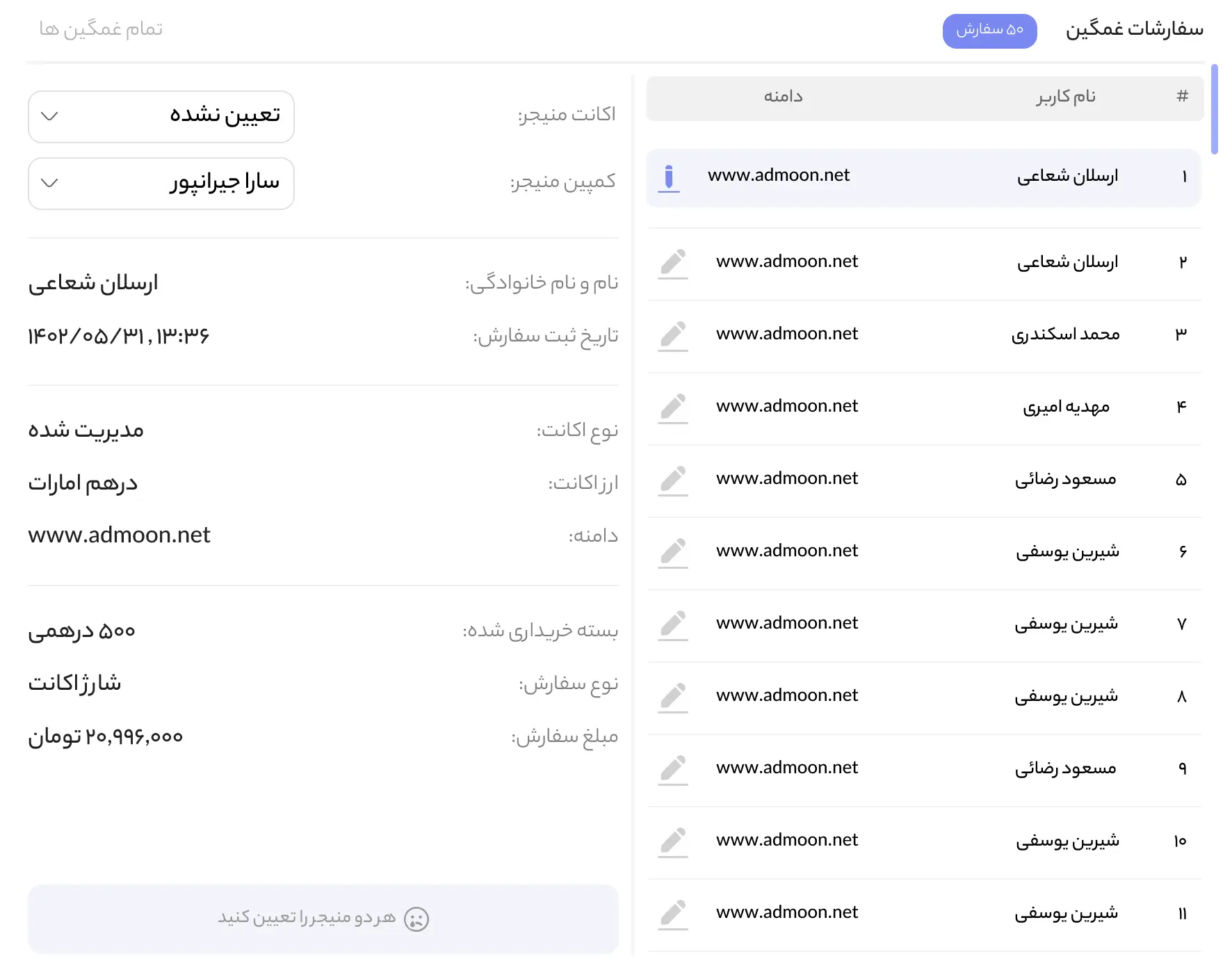
The Sad Order Feature

Problem

When order volume was high, newly purchased accounts sat unassigned. Nobody noticed until a client complained.

Insight

The problem wasn't the workflow — it was visibility.

Solution

"Sad Order" indicator on the admin dashboard surfacing all unassigned orders at login. Small feature, outsized operational impact.

05

The Simplified Google Ads View

Problem

Many clients were afraid of Google Ads — past mistakes, confusing interfaces, payment complexity.

Insight

They didn't need Google Ads. They needed the feeling of control without the complexity.

Solution

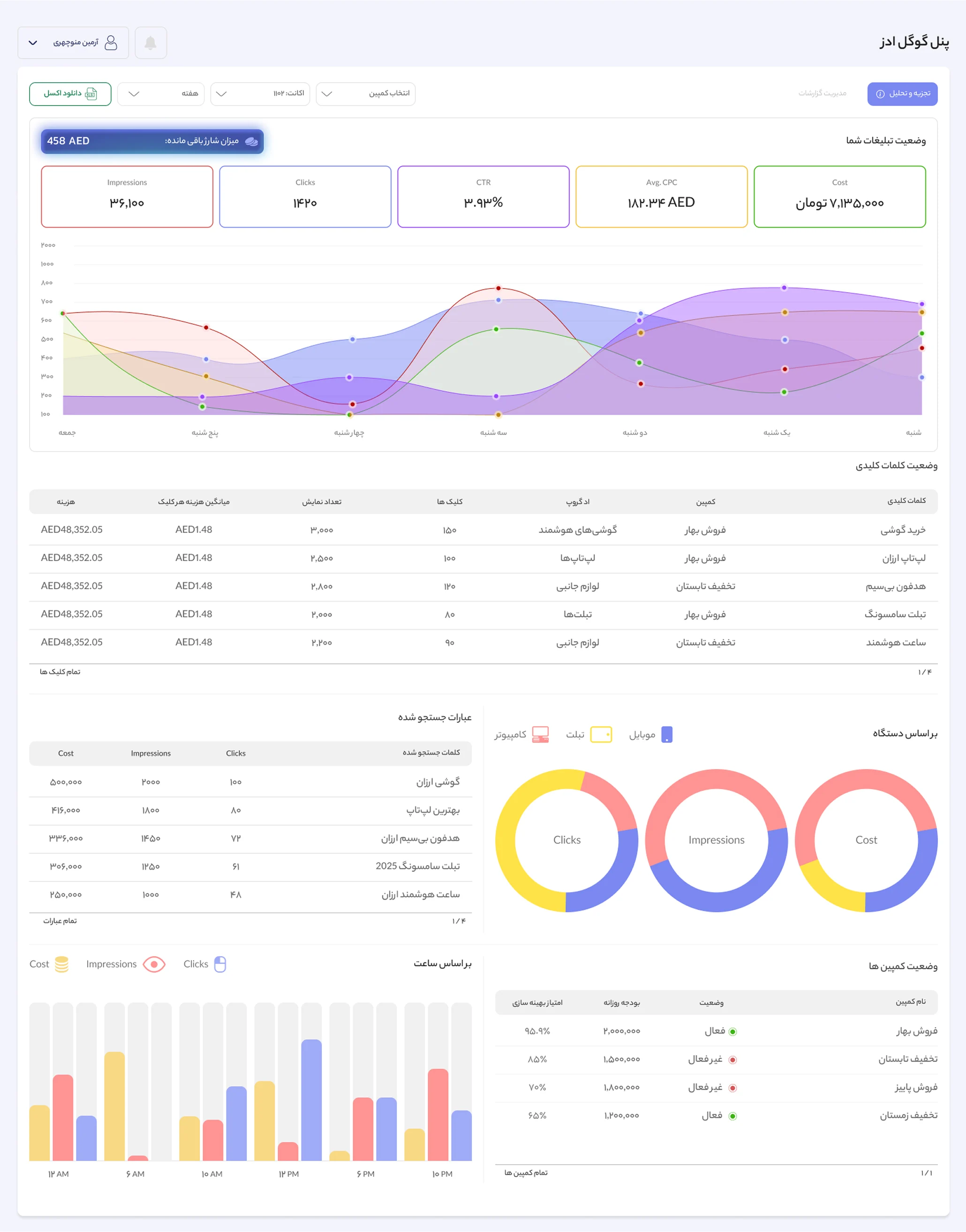
Simplified Google Ads monitoring view inside the platform — only the data that mattered, no Google Ads knowledge required.

06

The Admin Analytics & User Behavior System

Problem

Admins had no structured way to understand their own performance or their clients' behavior.

Insight

Admins needed a mirror for their own performance and a behavioral profile for every client.

Solution

Full analytics system — admin income trends, sell KPIs, monthly targets with progress tracking, top/bottom user rankings. 10-metric behavioral rating system per client with order success/failure analysis, wallet usage patterns, and payment preferences.

Assets
Site Map
User Panel
19 pages
Dashboard
Accounts
Buy Package
Orders
Financial Report
Ticket
Basket
Sign In / Up
Notification
Profile
Wallet
Fraud Detection
Overview
Click Report
Rules
Script
Google Ads Analysis
Overview
Report
Admin Panel
22 pages
Dashboard
User Page
Account Page
Ticket Page
Notification Page
Analysis Page
Orders Page
Success Orders
Failed Orders
Waiting for Payment
Waiting for Confirm
Refund Orders
Create Order
Create Invoice
Billing Page
Crypto
Wallet
Online Gateway
Payment Link
User Profile
Accounts
Wallet
Super Admin Panel
33 pages
Dashboard
User Page
Account Page
Ticket Page
Notification Page
Orders Page
Success Orders
Failed Orders
Waiting for Payment
Waiting for Confirm
Refund Orders
Create Order
Create Invoice
Billing Page
Crypto
Wallet
Online Gateway
Payment Link
Analysis Page
Overview Analysis
Manager Analysis
Company Analysis
Orders Analysis
Admin Settings
List of Admins
Commission Setting
Settings
Package Settings
Notification & Alarm
Currency Settings
User Profile
Accounts
Wallet
Purchase Flow
From sign-up to a paid order — four payment paths.
decision
user action
system
success state
waiting state
blocked state
NoYesYesNoYesNoHas platformaccount?Sign UpSign InPlatform accountcreatedHas adaccount?Buy Package → selectad accountAccounts → new adaccountFill: currency, name,email, industry,domainAd account createdSelect package ormanual amountFinalizeBasket opensOptional: add FraudDetectionReview invoiceChoose paymentOnline GatewayRedirect to gatewayComplete paymentOrder SuccessWalletSelect wallet(s)Balancesufficient?Order SuccessInsufficient — seeMulti-Currency flow ↓CryptoSelect type + networkGet wallet addressCalc crypto amount(daily rate)Pay externally + inputtx hash → SubmitWaiting forconfirmationAdmin confirmsOrder SuccessPayment LinkInvoice generatedConfirm + copy linkFinancial team paysexternallyOrder Success
Refund Flow
Admin-initiated refund — formula-driven calculation and approval.
decision
user action
system
success state
waiting state
blocked state
All order pricePartialYesNoYesNoAdmin: Success Orders→ find order → RefundRefund modal opensRefund type?Invoicerequested?Wage settings (% ofwages to refund)Reason for refundRefund destination:bank or walletCurrency rate: todayor order-dateReason for refundRefund destination:bank or walletType custom refundamountCurrency rate: todayor order-dateWage settings per wagetype (% or exact)Reason for refundRefund destination:bank or walletSubmit → success →added to Refund PagetableAccountant reviewsApproved?Refund processedRefund denied
Multi-Currency Wallet Flow
When one wallet isn't enough — combine wallets or top up, in any currency.
decision
user action
system
success state
waiting state
blocked state
YesNoAdd walletCharge walletYesNoYesNoSelect ad account +planReview & Payment →BasketPay by WalletList wallets: balancein own + ordercurrencySelect wallet(s) —multi-selectBalancesufficient?Order summary: walletsused, deducted perwallet, remainingInsufficient balanceSelect additionalwalletAuto-convert eachwallet to ordercurrency (daily rate)Combinedsufficient?Charge Wallet (modal)Pre-selects wallet,shows shortfall,amount auto-filledPay via gateway(wallet or ordercurrency)Wallet charged →return to basketNowsufficient?ConfirmOrder Success

The Admin Dashboard

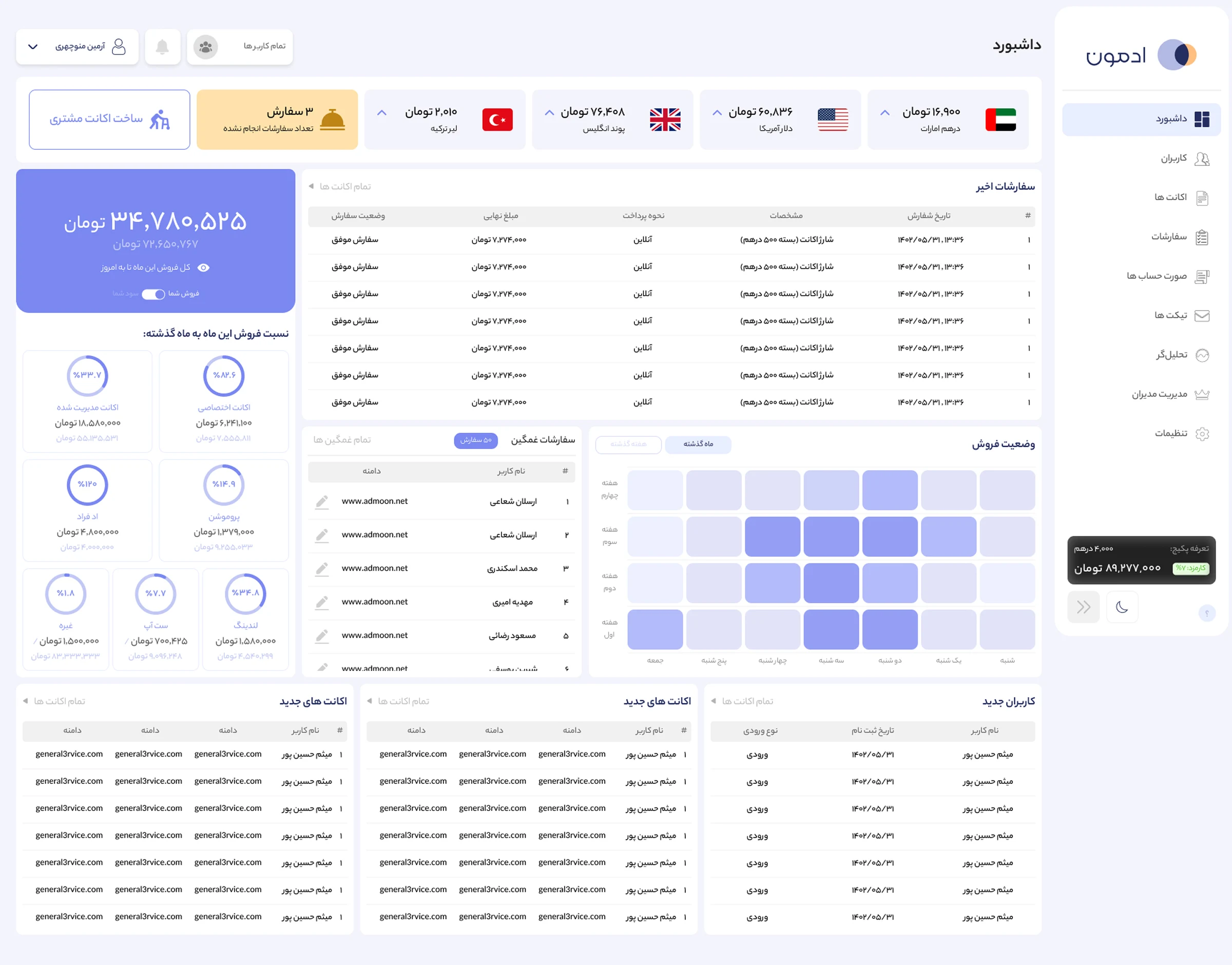
The admin's command center. Income is broken down by service — how much they earn from each offering they sell — alongside total sales and total monthly income. At a glance they see the Sad Order indicator, the latest submitted orders, and lists of new users and new accounts. An activity timeline shows where their performance peaks and where it drops. And they can create a new user directly from here — part of the admin-as-user proxy.

Admoon admin dashboard

The Client 360 View

Every client, fully legible — identity, behavior, orders, and wallets in one place.

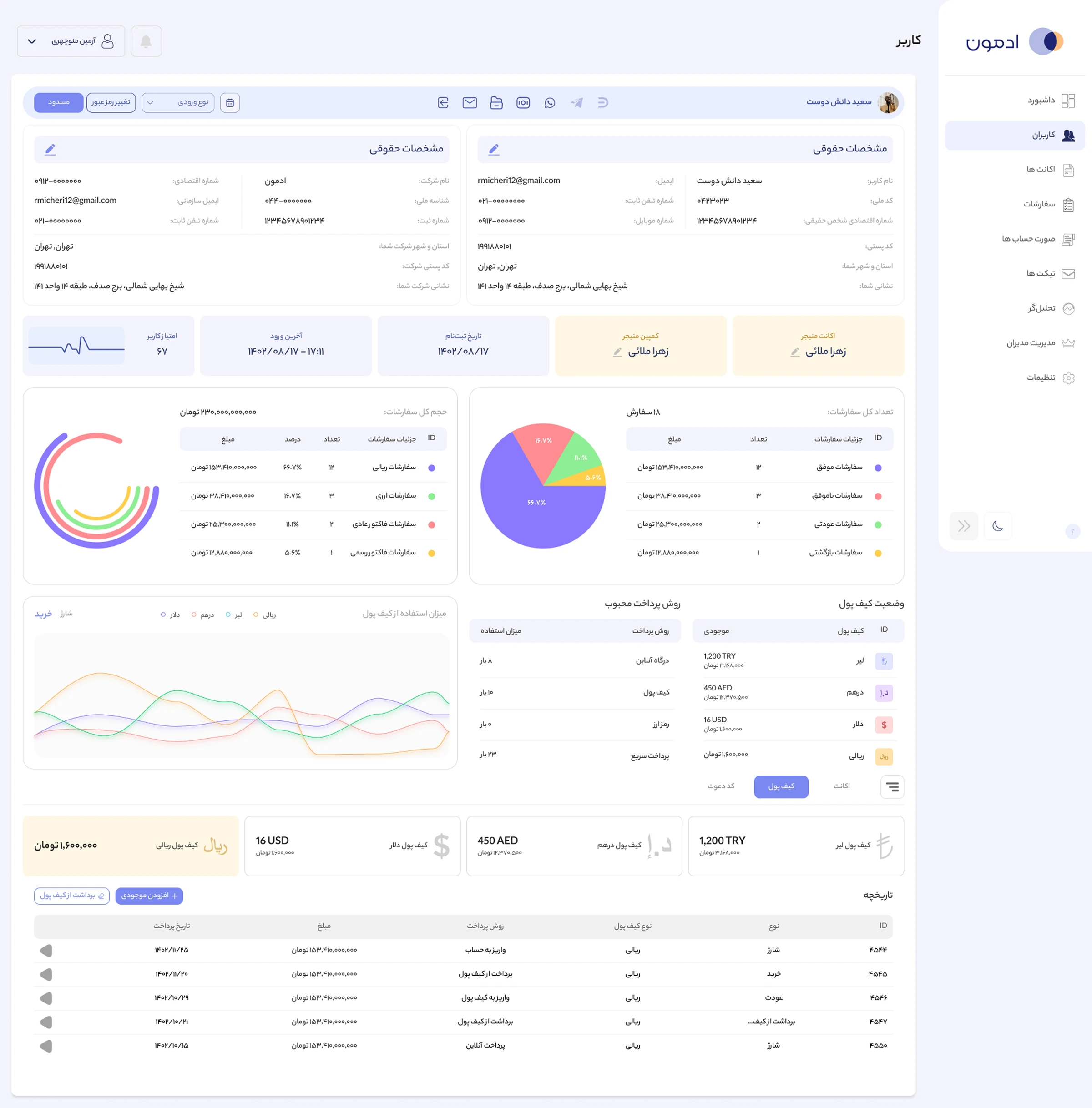
From a single client profile, an admin sees everything: full personal and legal details (editable in place), the account and campaign managers assigned, and a behavioral score computed from real signals — purchase volume, refund frequency, manager ratings, most-used services, wallet reliance, and more. Below that, the complete order picture — total, successful, failed, and refunded, with each client's share of revenue — then their wallet balances across currencies, payment-method usage, and a full wallet activity history the admin can act on directly, adding or deducting balance. It's the data layer that makes the admin-as-user proxy possible: you can't operate on someone's behalf until you can fully see them.

Admoon client 360 profile view

Multi-Currency Payment

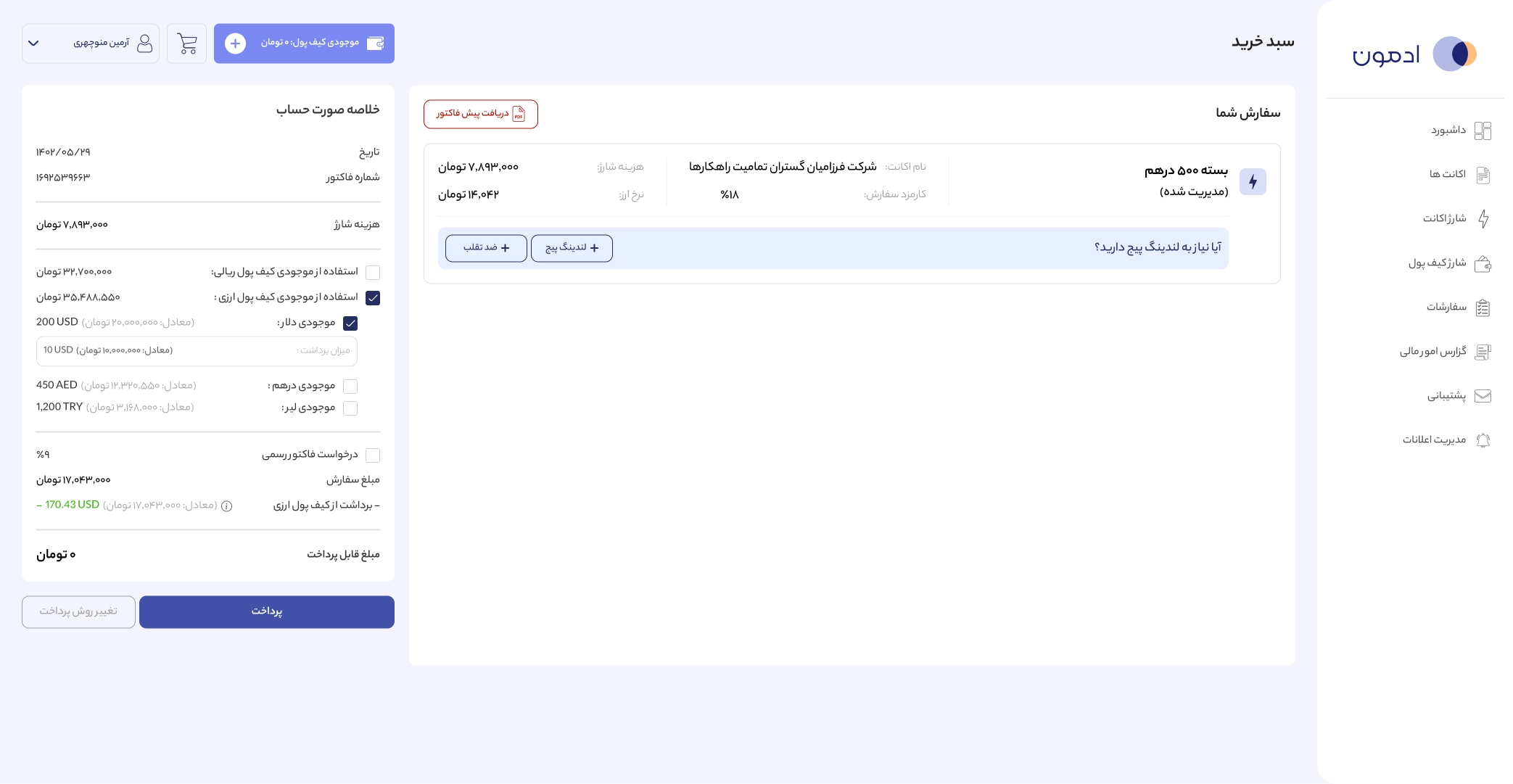
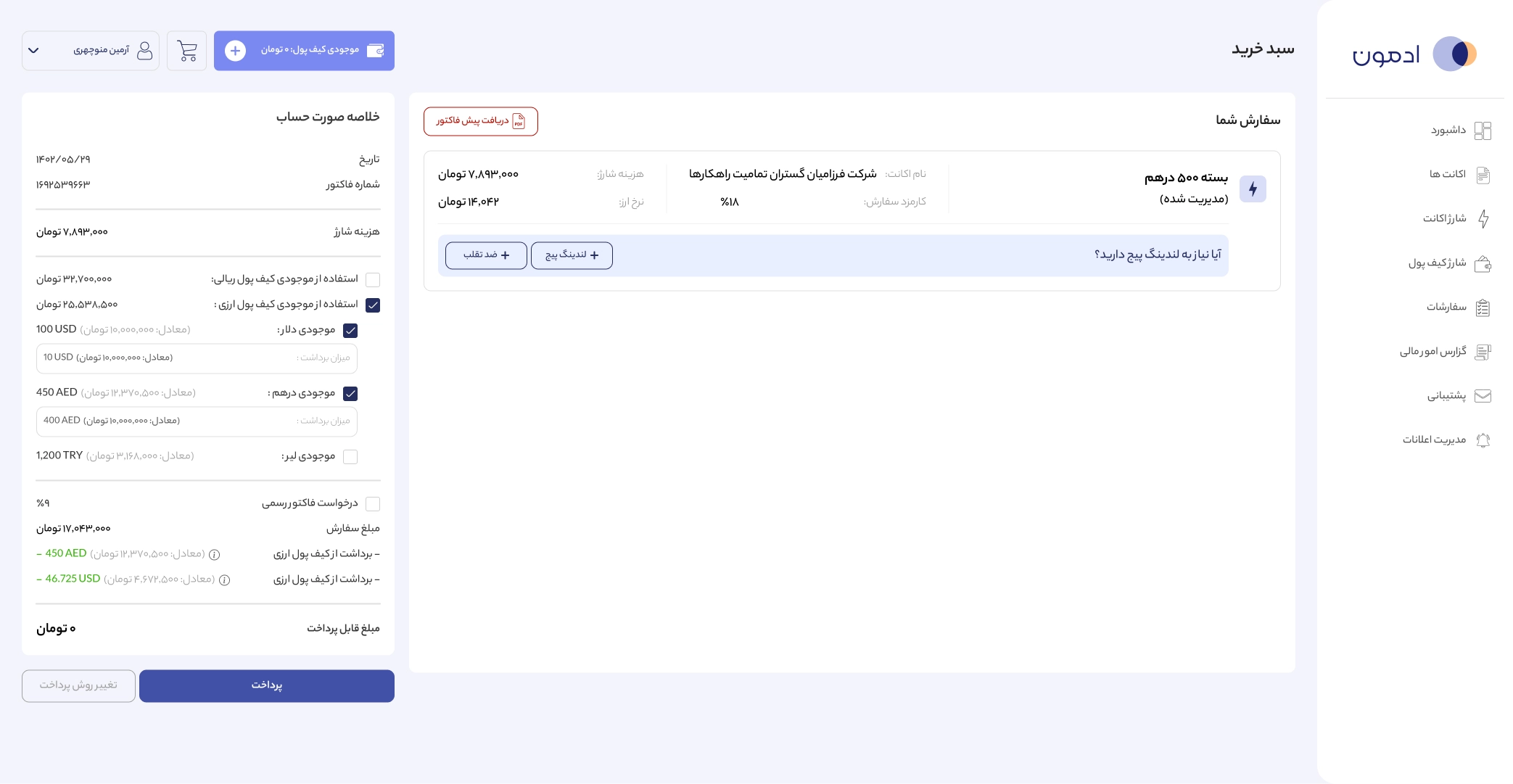
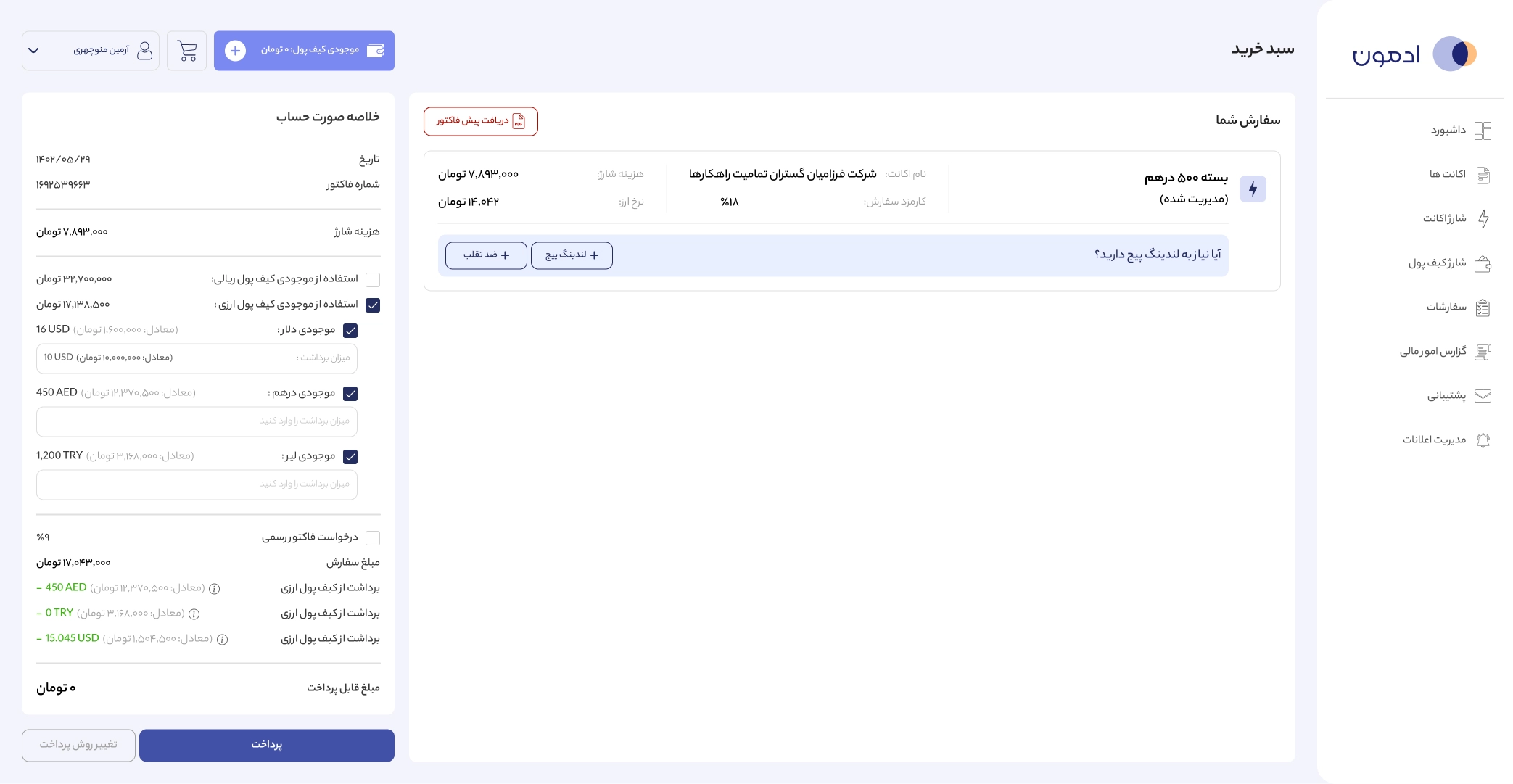
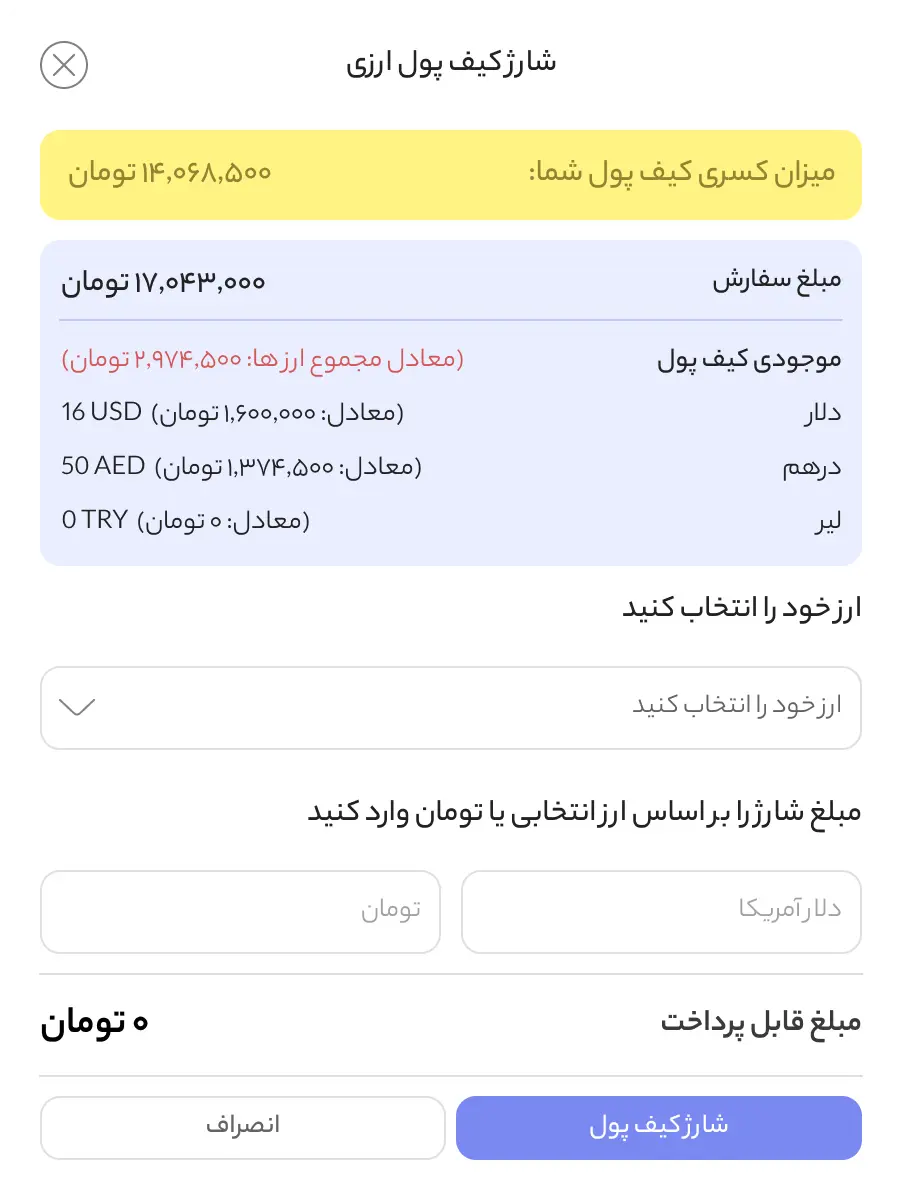
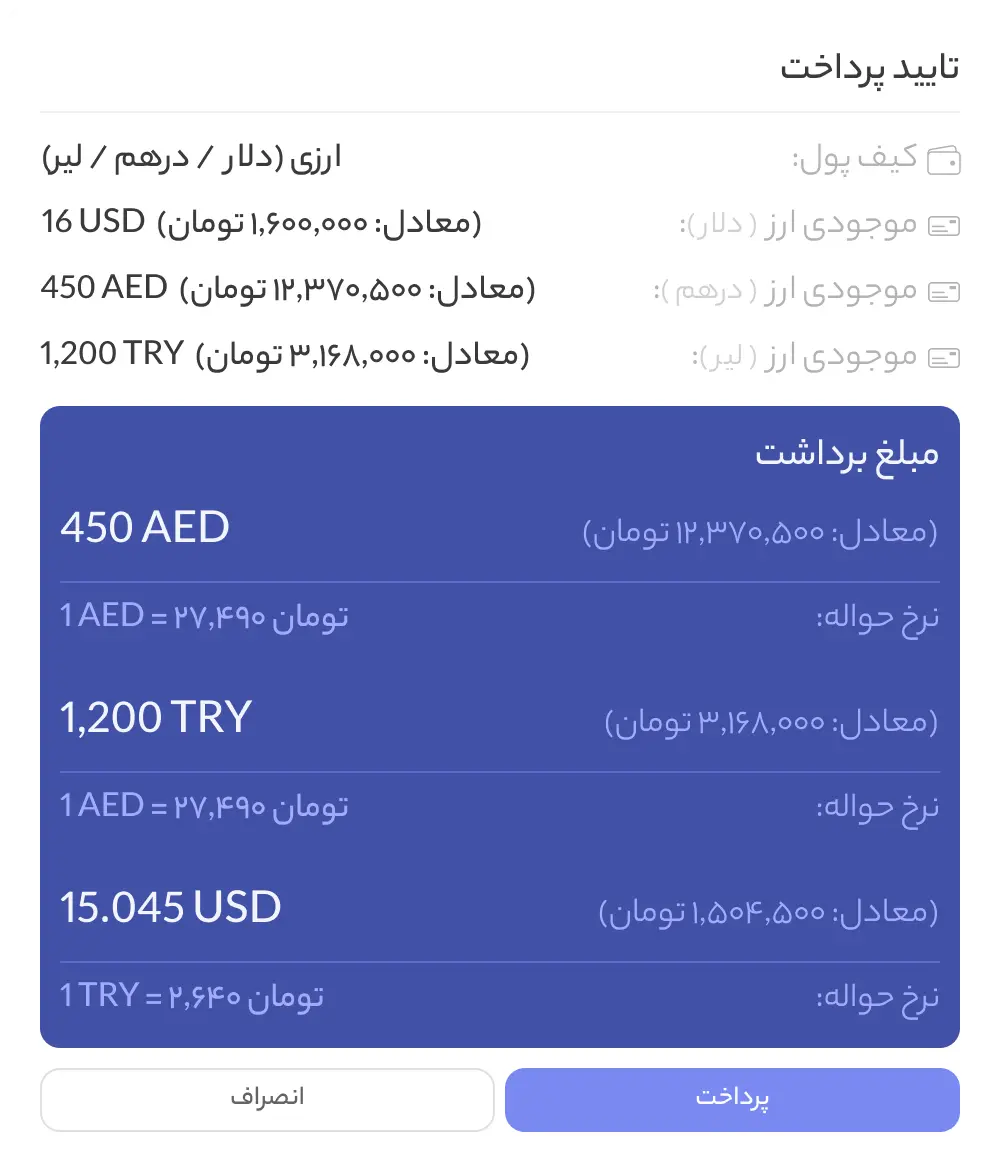
Users rarely hold their full balance in one currency. So checkout lets them combine wallets — Dollar, Dirham, Lira — in a single payment, converting each at the daily rate and showing exactly what's deducted from where. If the combined balance still falls short, they top up inline and confirm. No abandoned orders over a currency mismatch.

Basket page — one currency selected
Basket page — two currencies selected
Basket page — all currencies selected
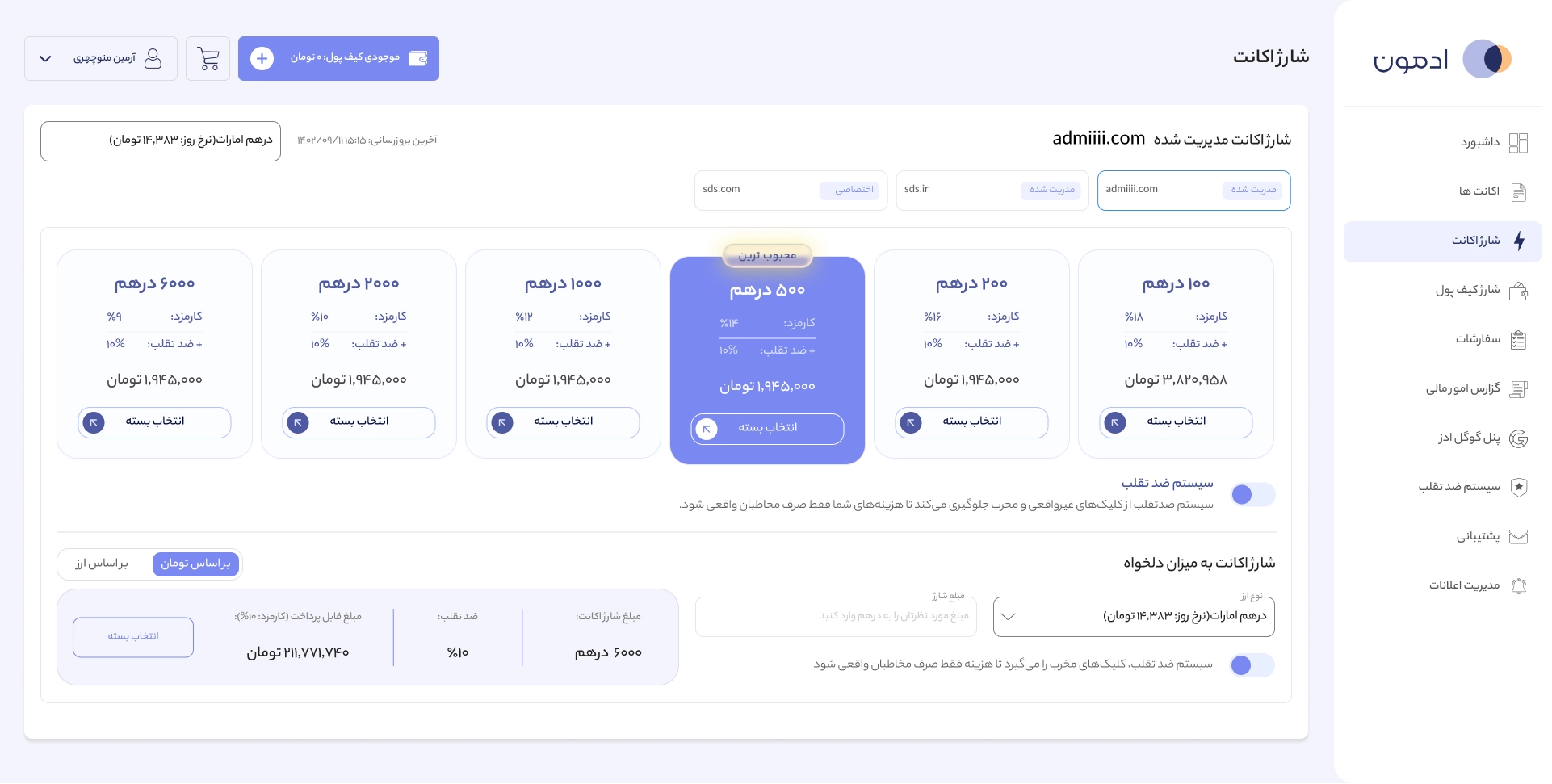
User package and charge page showing preset tiers, most popular highlight, fee breakdown, anti-fraud toggle, and custom amount option

Buying, Without the Fear

Many clients were afraid of Google Ads — confusing pricing, hidden complexity, past mistakes. So the charge screen makes the whole decision legible: clear package tiers with a recommended option, every fee (commission and anti-fraud) shown up front, and a custom-amount path for clients who want precise control. The anti-fraud system — which later became its own product — is a simple toggle here. The goal wasn't to teach clients Google Ads. It was to give them the feeling of control without the complexity.

Roles at a glance
Roles at a glance
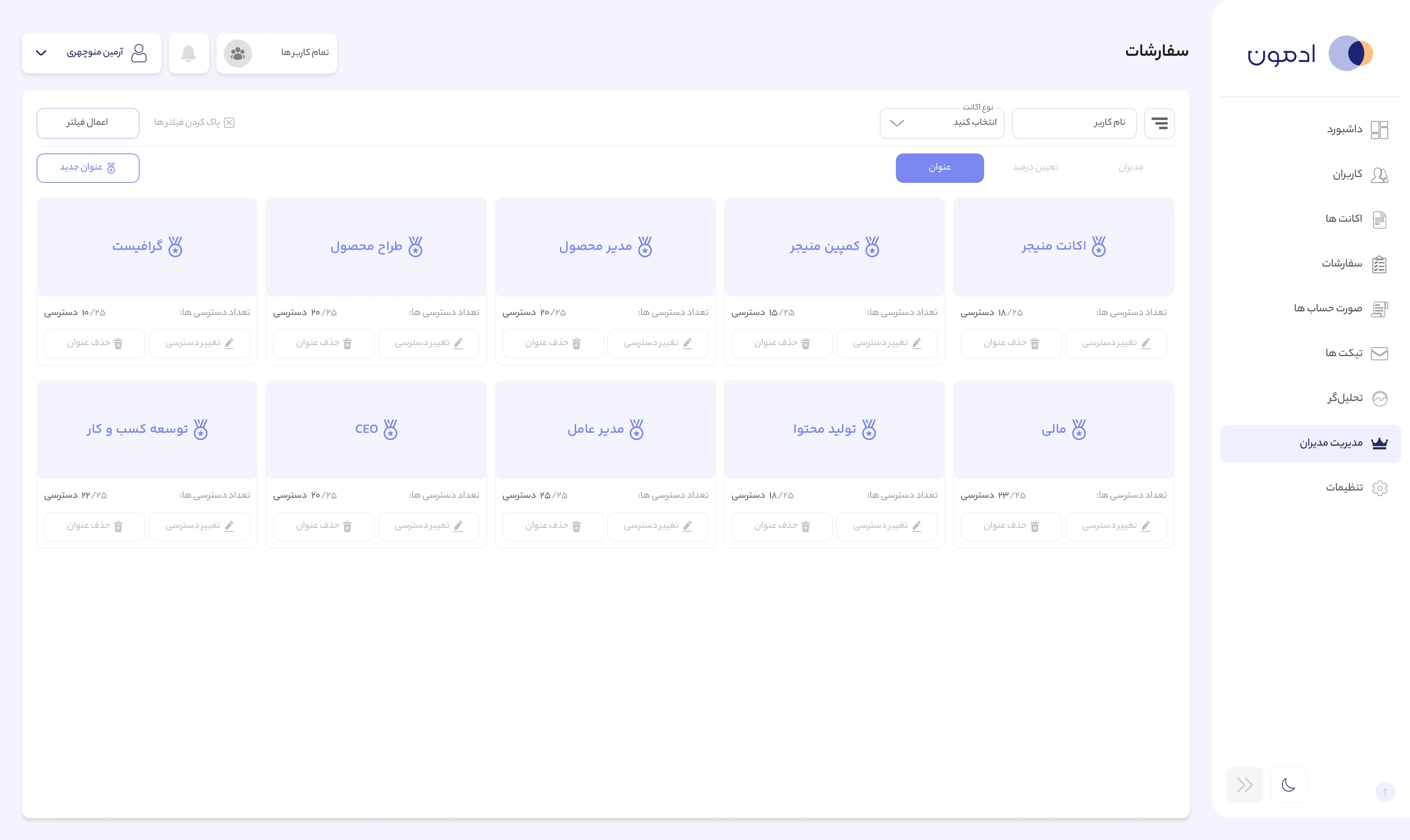
Granular per-feature access

Who Can Do What

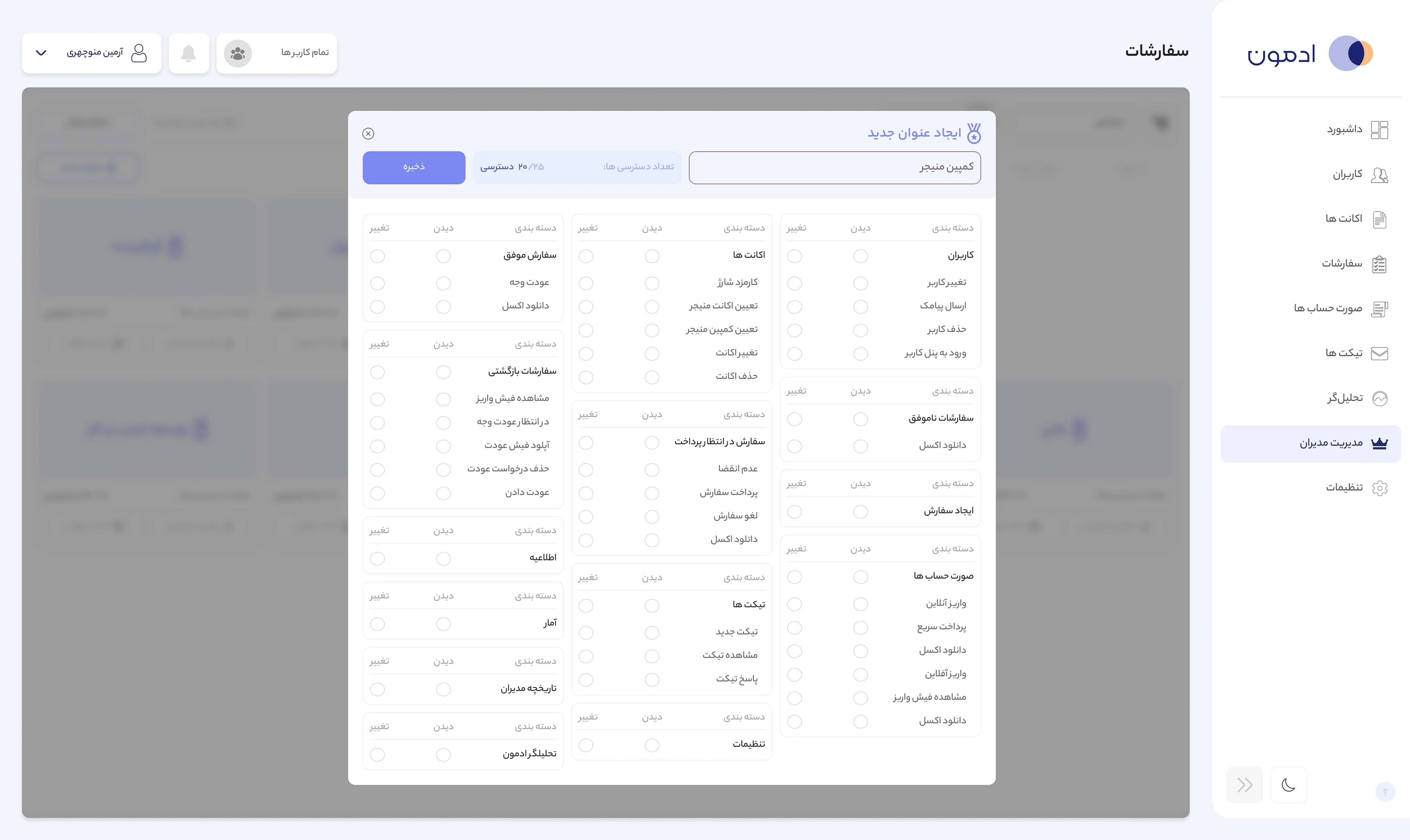
A 25-permission role system governing every action across three panels. At the top of the platform, the super admin defines roles — Account Manager, Campaign Manager, Finance, CEO, and more — each with a precise access footprint. Creating a role means setting view and edit rights across 25 features, panel by panel. It's the governance layer that lets a multi-team agency operate safely on one system.

Controlling What Users See

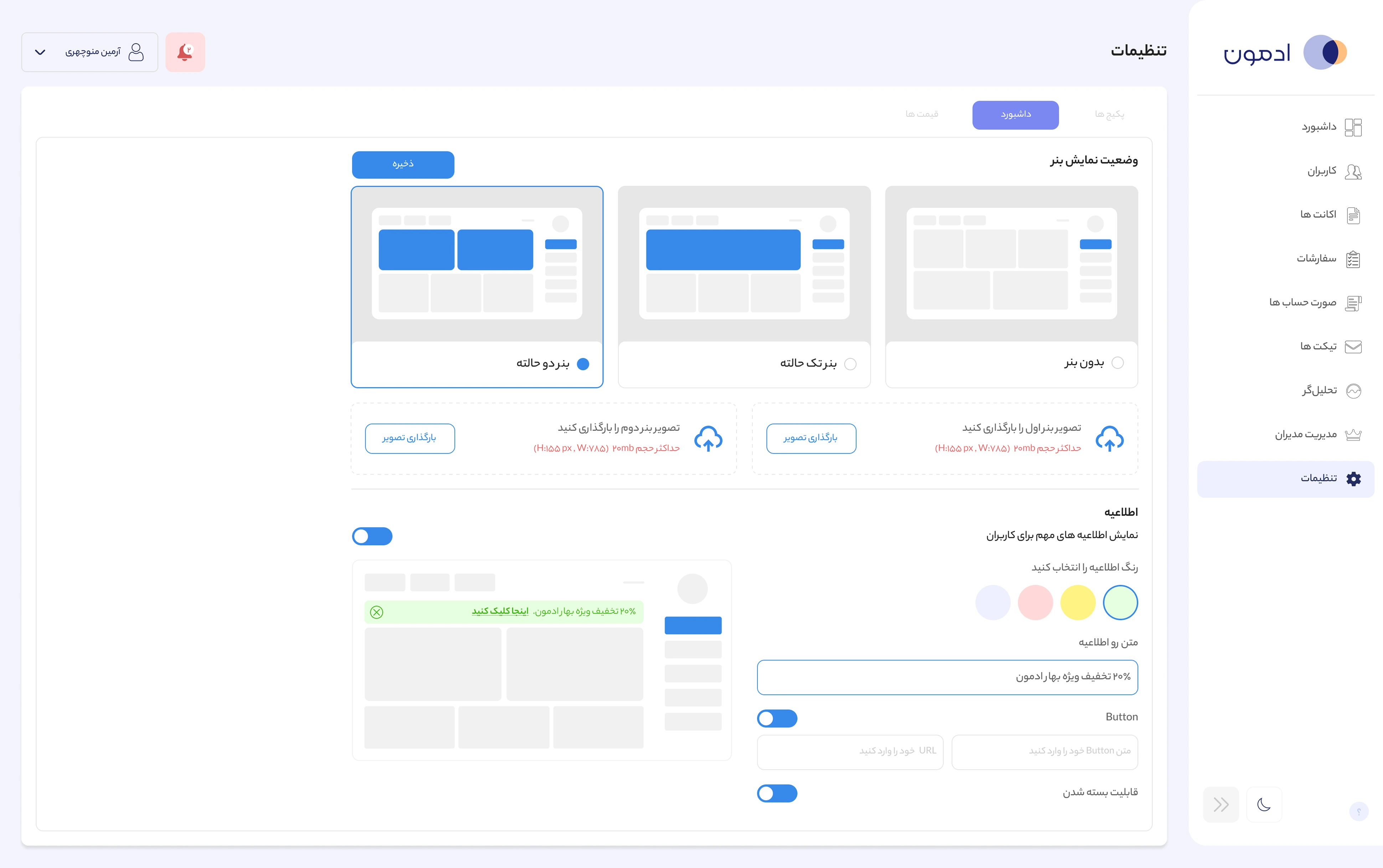
At the top of the platform, the super admin controls the entire user-facing message layer. Banner display adapts per device — dual, single, or none — with its own image slots. Announcements get a live preview, a color, custom text, an action button with a link, and a dismissibility setting, all logged and reusable. One operator coordinates what every user sees, without a single line of code.

Super admin banner settings screen showing banner display modes with Mobile/Web toggle and image upload slots, and an announcement builder with live preview, color picker, message text, action button, and dismissibility toggle
Design System

One System, Two Roles, Every Surface

The primitives, tokens, and components behind the platform — explorable.

Token Architecture
PRIMITIVES
SEMANTIC
COMPONENTS
Blue
Red
Green
Orange
Cyan
Purple
Neutral
primary#4E59A1
danger#953154
success#649651
warning#FAC995
info#60A4A4
accent#604089
surface#F0F4F8
Button
primary
danger
success
Badge
warning
info
accent
raw values → named roles → UI expressions
Color Ramps
?
find the chain1
Red
#671935
Green
#649651
Cyan
#8DD2D1
Purple
#472375
Orange
#623911
Blue
#FBFCFF
Gray
#252525
Neutral
#FFFFFF
TypographyYekan Bakh · Persian
Display40px · 700
ادمون — مدیریت هوشمند تبلیغات
Heading28px · 700
مدیریت حساب‌های تبلیغاتی
Title22px · 500
داشبورد و گزارش‌ها
Body16px · 400
سفارش‌ها با موفقیت ثبت شدند
Caption13px · 400
جزئیات تراکنش را بررسی کنید
Label11px · 300
وضعیت: فعال
Buttons
Large
Medium
Small
X Small
Filled
Outline
Text
Secondary
Confirm
Cancel
+ more variants in the full library
Icons114 · Optimized set
More
Add
Arrow-down
Arrow-down-2
Arrow-left
Arrow-left-2
Arrow-right
Arrow-right-2
Arrow-up
Arrow-up-2
Product-1
Calendar
Call
Category
Close-circle
Upload
Download-1
Document
Dollar
Dollar-2
Edit
Edit-2
Eraser
Eye
Eye-slash
Order-2
Forbidden
Forbidden-2
Grid
Home
Download-2
Info
Link
Login
Logout
Add-2
Chat
Money - Currency
Dark
Notification
Password
Percentage
Save
Search
Telegram
Setting
Setting-2
Shopping
Filter
Star
Light
Tick
Tick-2
Unlock
User
Verify
Refund
minus
In progress
Pend
Dismiss
Dollar-3
AED dirham
Dollar Rupee
Type
Industry
Appeal
Adwords
Invoice
Copy
Hashtag
Status
Flame
Service
Location
Homeland
Lead
Management
Users
Mail
Excel
What's app
Enter
Delete
play
Wait
Answer
Excel2
Danger
Switch
History
E-mail
Analysis
Accounts
New Dirham
New Dollar
Bin
Admin
Menu
Quiz
Run
Campaign
User Tracker
Keyword
Session
What's_app
Warning
Click
Warning 3
Connected
Active
Disconnect
Inactive
Not found